
Giving teachers back their time
Learning Lens uses AI to automatically synthesize student data, giving teachers real-time visibility into every student's progress during Project Based Learning.

Project Length
3 weeks, aasynchronous
Project Type
Web app
Team Size
1 designer, 3 engineers, 3 business & presentation (7 total)
My Role
Product Designer · Design QA & Dev Collaboration
Recognition
Honorable mention, top 6 out of 13 teams, judge panel
Problem
Why are teachers not implementing PBL?
Most teachers abandon PBL entirely, not because they don't believe in it, but because the data overwhelms them.
In PBL, every student tackles challenges differently, generating a flood of data no teacher can realistically track alone. Without a way to synthesize it quickly, giving each student tailored feedback becomes impossible.
What is PBL?
Project Based Learning (PBL) is a teaching method where students tackle real, complex challenges over an extended period, rather than following a single structured lesson plan.
Solution
How does Learning Lens give teachers back their time?
Learning Lens uses AI to automatically synthesize student work, giving teachers real-time visibility without extra effort.
👑 Top 6
of 13 teams · Honorable mention · Judge panel
Real-Time learning visibility
Track progress across all project stages
AI-powered work analysis
Automatically reviews artifacts and reflections to identify skill growth
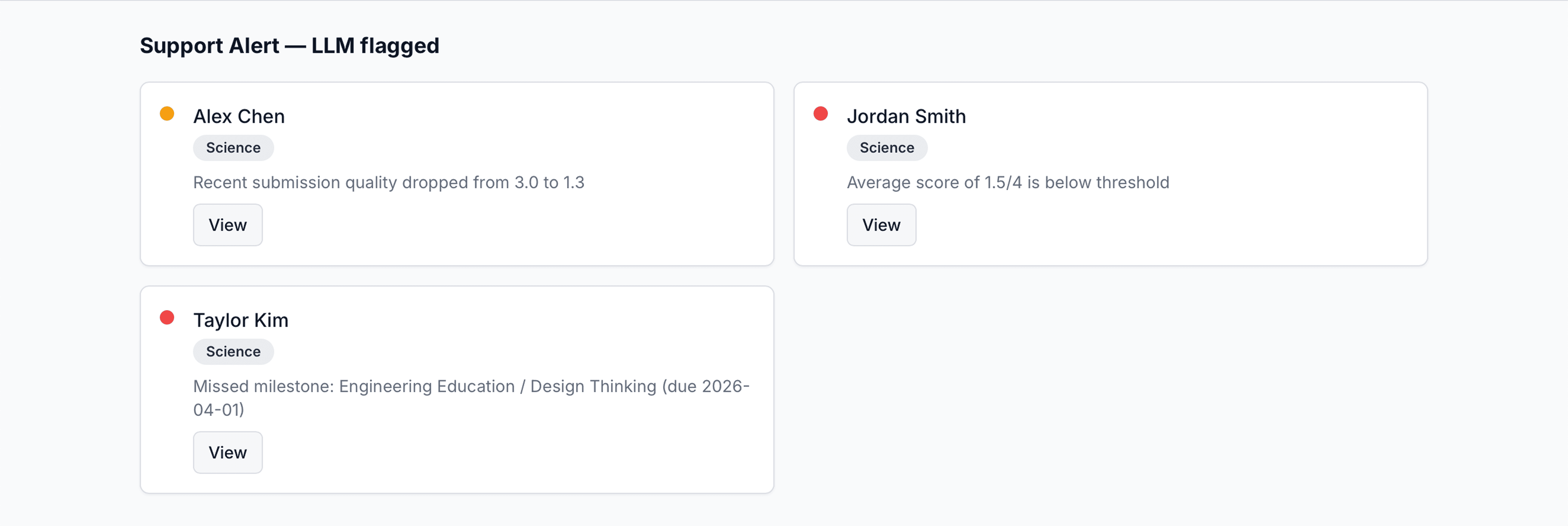
Teacher dashboard & alerts
See who's progressing, who needs help, and where to intervene
Student Evidence Gallery
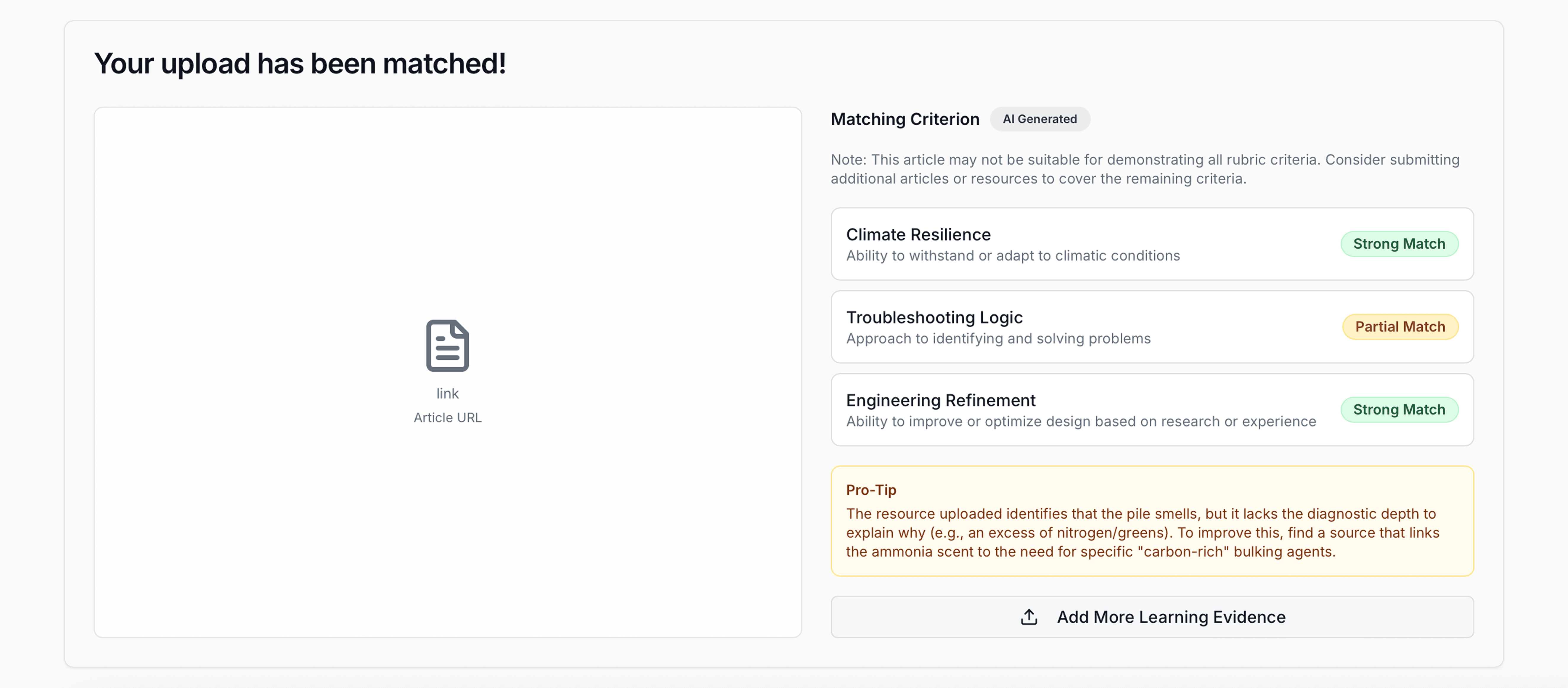
Student Alerts on Teacher Dashboard
Learning Lens was built to provide teachers a tool that do it all.
Here's how we brought it to life.
Discovery
What were teachers missing from their existing tools?
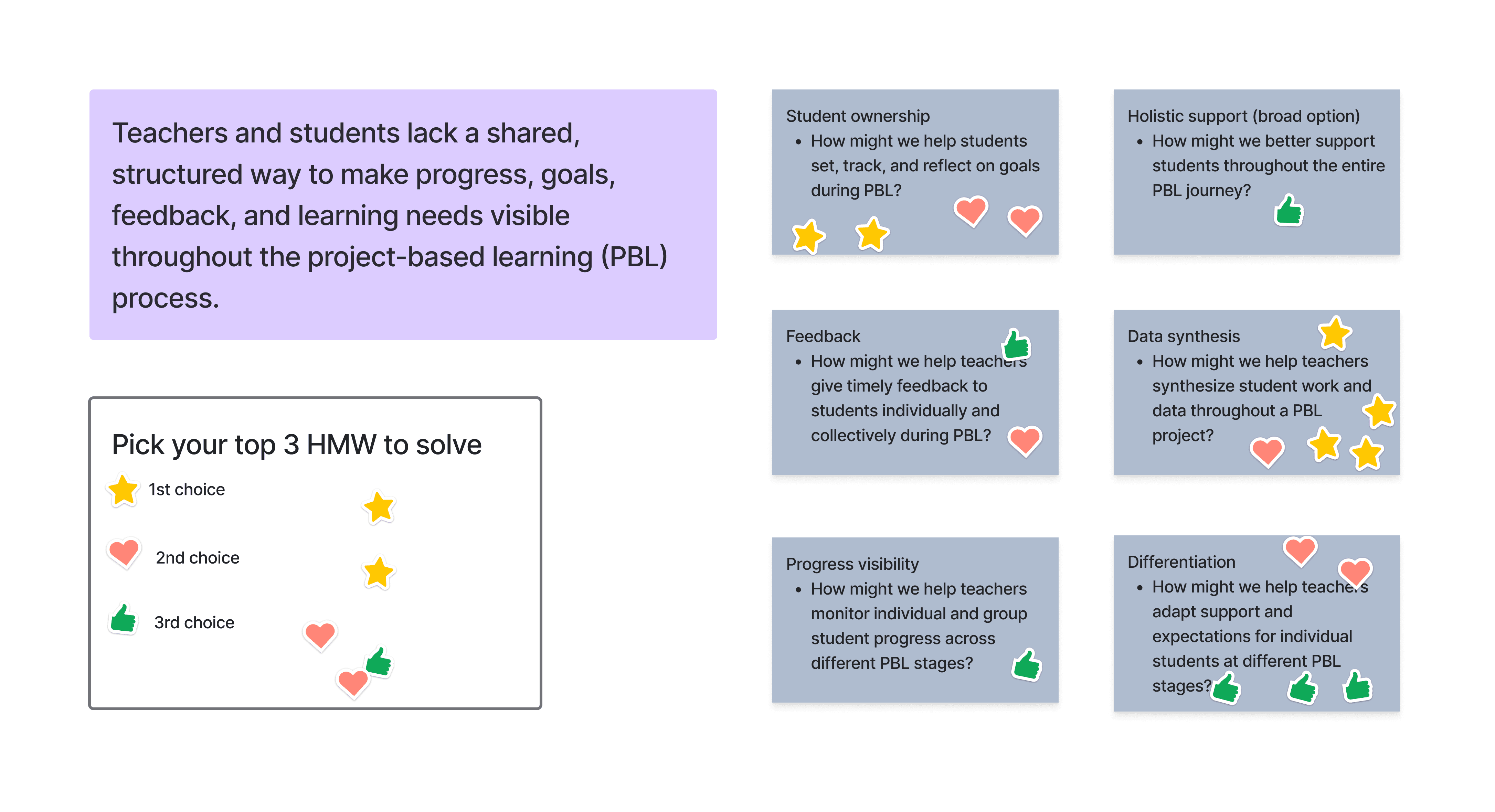
Teachers and students lack a shared, structured way to make progress, goals, and learning needs visible throughout PBL.
Most of our team members have a background in education. Drawing on that experience and our knowledge of existing edtech tools, we found that these products span across three categories: AI assistants, project management, and portfolio management. While each category has strong solutions, none offered teachers a one-stop experience that brings all three together.
Existing tools & Gaps
AI ASSISTANT
Magic School, Flint
AI capabilities not applied to PBL student work specifically
Project Management
Google Classroom, Canvas, Schoology, Trello, Asana, Miro
Helps organize tasks but can't tell teachers who needs help right now
Portfolio Management
Seesaw, Peergrade, Bulb
Captures student work retrospectively but lacks real-time tracking
Defining focus
What did the data tell us to build first?
Our vote confirmed: solve for what happens after the lesson starts, not before.
That became our north star.
We generated How Might We statements based on our research, then voted as a team to prioritize which problem to solve first. The vote aligned us around one key insight:
Teachers aren't struggling with planning, they're experienced at that
The breakdown happens mid-project, when student data becomes impossible to track manually
Teacher planning was deliberately scoped out as a future opportunity.
Voting on our How Might We statements to find our north star
Teachers shouldn't have to chase data.
We simplified the workflow so the data comes to them.
user flow
Designing for two users at once
Teachers shouldn't have to chase data.
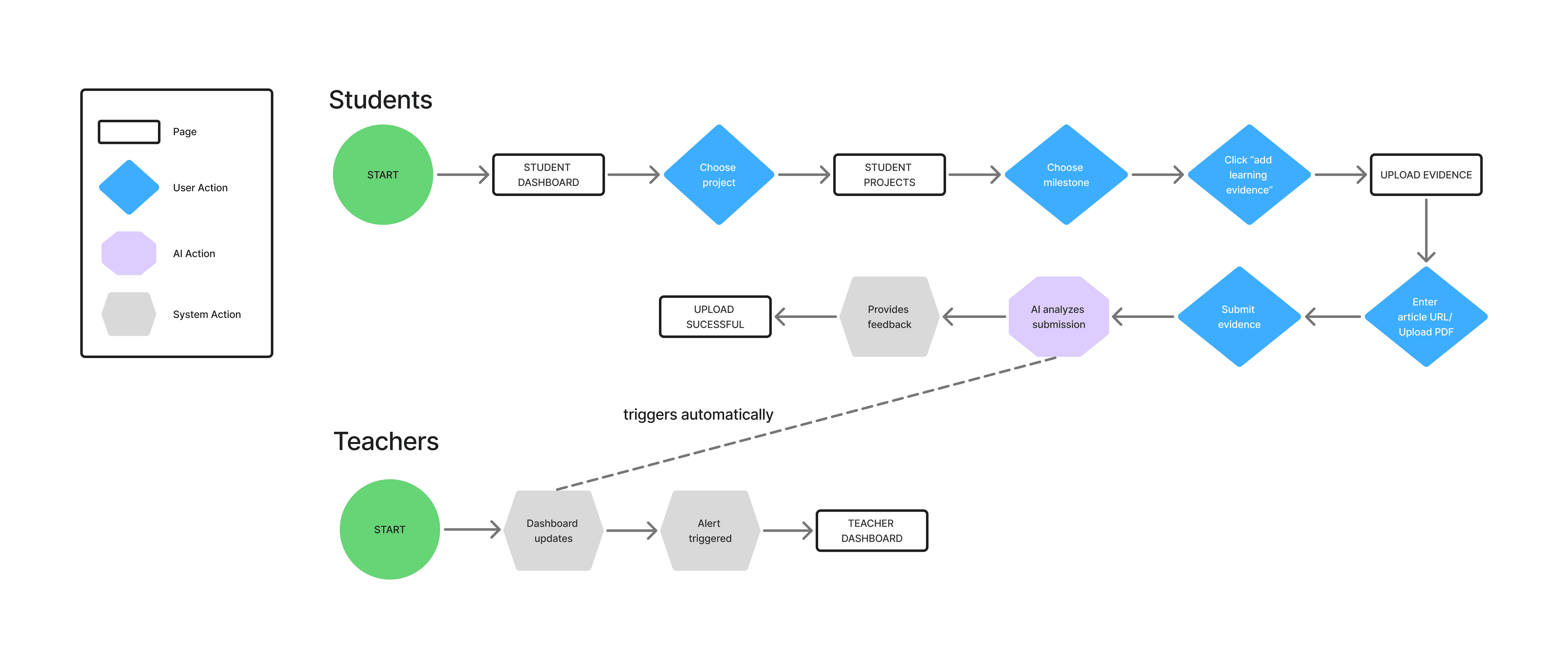
We designed the flow so student work is automatically analyzed by AI against the rubric, and the results surface to the teacher in real time.
View full user flow
Student and teacher flows showing how every student action triggers a teacher response.
Defining focus
Wireframes & Design QA
How the designs took shape
I started with wireframes, reviewed the build, and worked with the engineer to get it right.
wireframes
Mid-fi screens mapping the student milestone flow and 4 checkpoint states

DESIGN QA
Annotated screens to flag missing states, interaction gaps, and priority fixes.
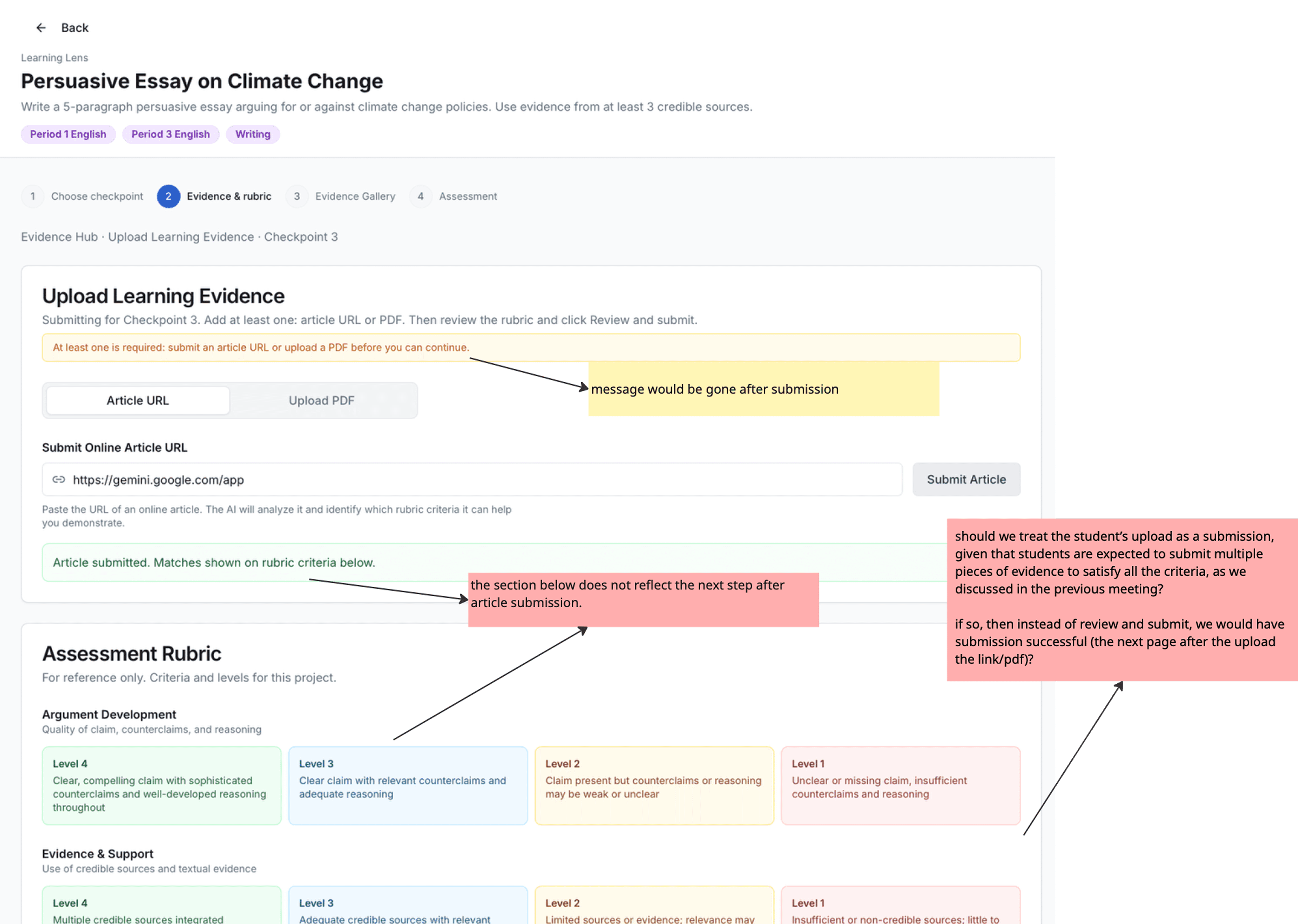
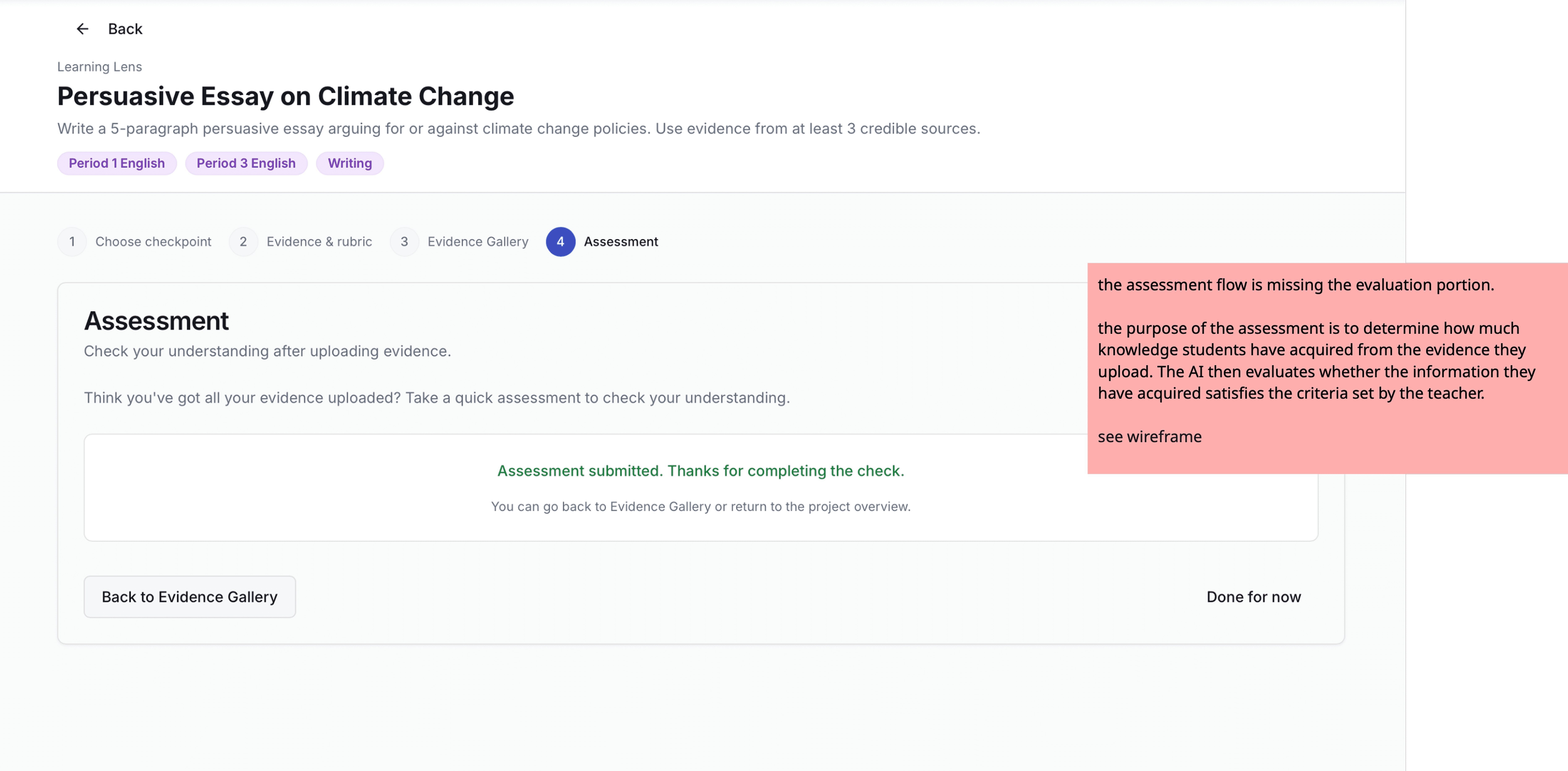
We now know the why, then…
WHAT SHOULD I BUILD FIRST?
Teachers valued SEEING annotations over students CREATING them.
*All quotes translated from Mandarin to English. Original interviews conducted in Mandarin.
“
Being able to annotate is good, but I won't be able to see what they highlight…it would only be helpful if I am able to see what they annotate.”
K. Liu, 5th grade Mandarin teacher
“
The annotations need to be checked by teachers, otherwise it just becomes a drawing tool, then it wouldn't be as helpful.”
S. Dalton, 3rd grade Mandarin teacher
Based on research, I identified two gaps in the digital library.
Annotation tools
(giving students tools to annotate)
VS
Annotation collection
(giving teachers insight to student thinking)
Neither feature is valuable without the other.
Students need tools to annotate. Teachers need to see those annotations.
They only work as a pair.
HMW
How might we enable teachers to view student annotations directly on digital books to understand their thinking?
KEY DESIGN DECISIONS
01
Reducing User Friction
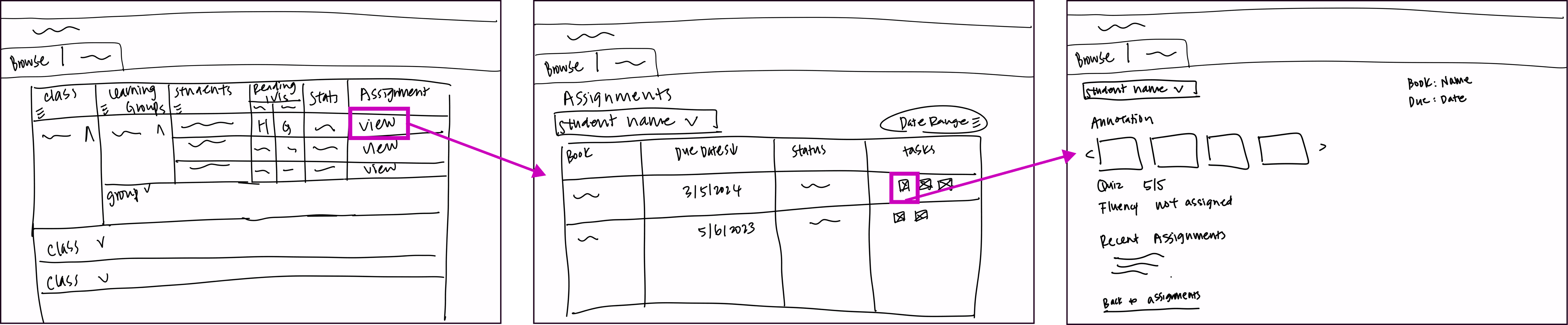
Add annotation viewing to current digital book flow
✓ Fits existing mental model
✓ Faster access
✗ Implementation Uncertainty
Other option explored:
Create dedicated annotation pages
Newly designed screens to view annotations
Update table layout/design
Add annotation viewing for teachers
✓ Purpose-built, clean experience
✗ New navigation to learn
✗ Extra steps to access
Accessing annotation on where teacher currently have access to students' reading history
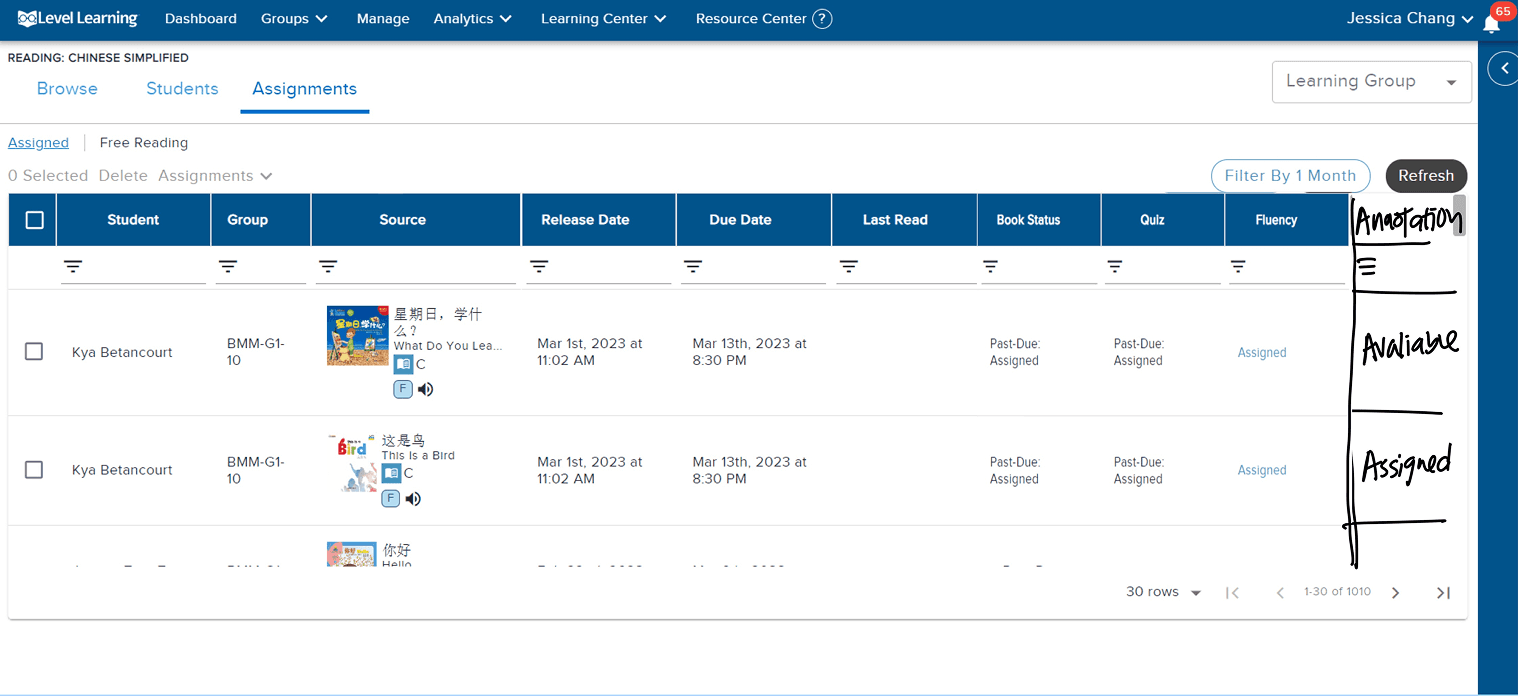
Adding annotation to the existing story page where teachers can currently view quiz results
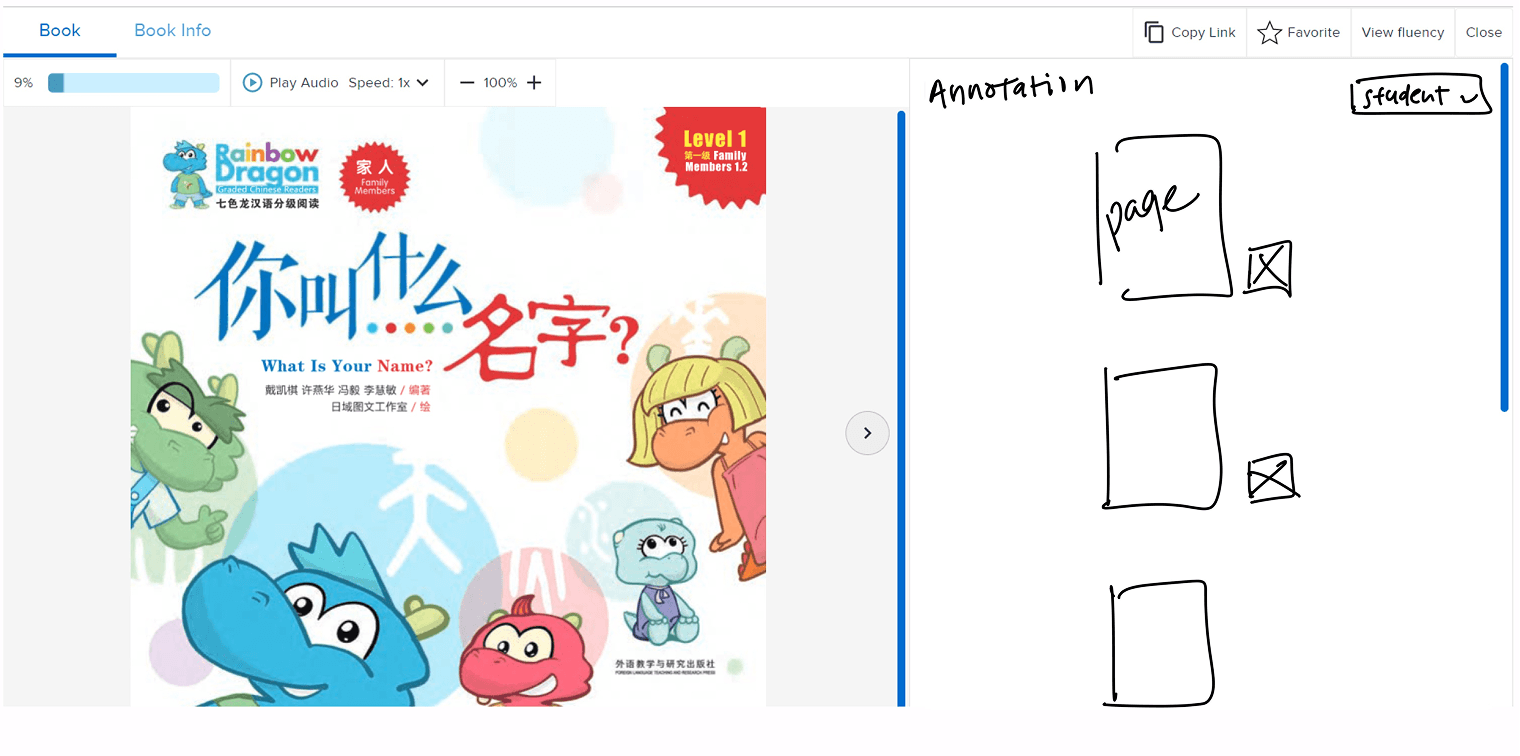
Rejected: Dedicated annotation pages
02
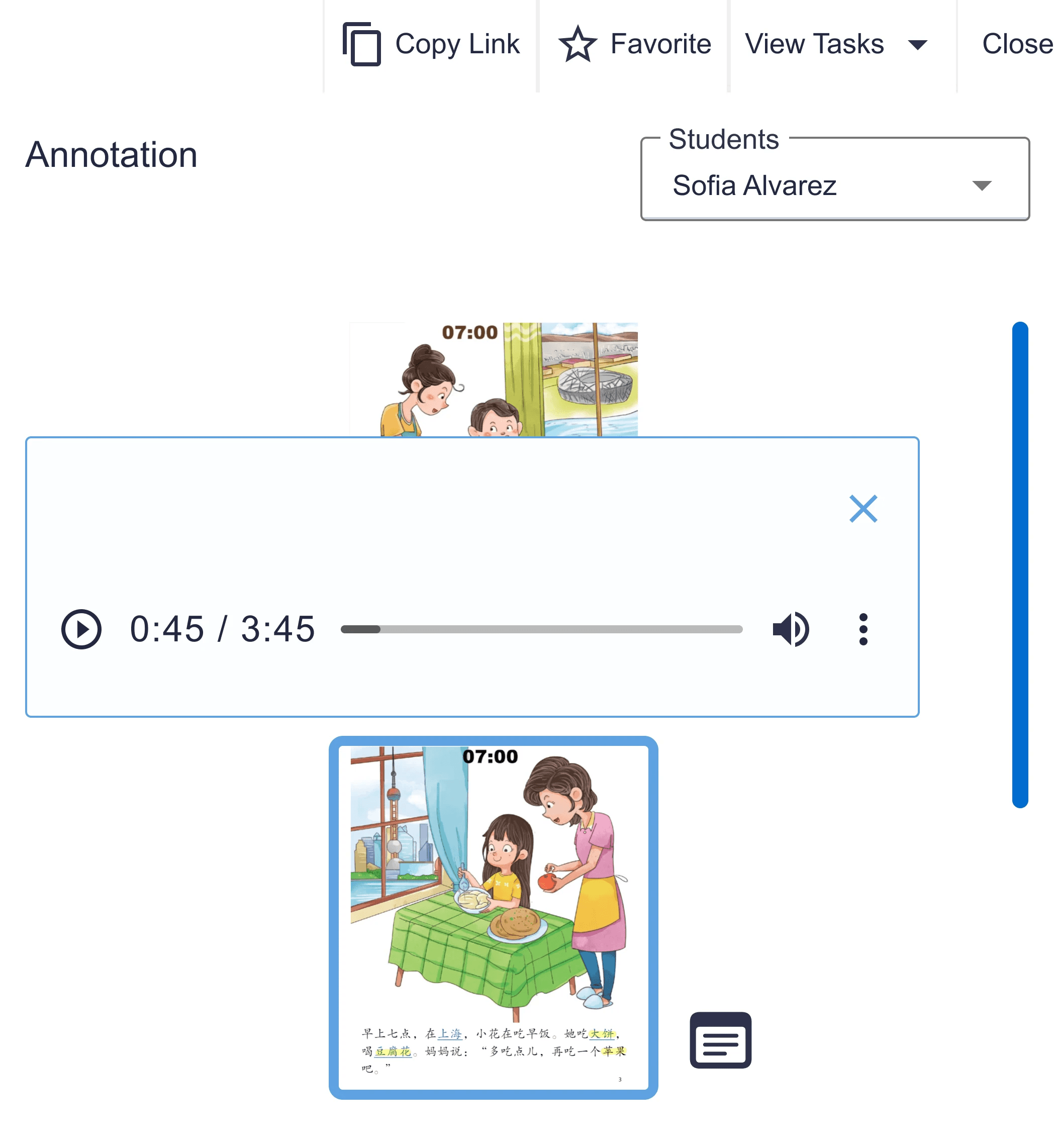
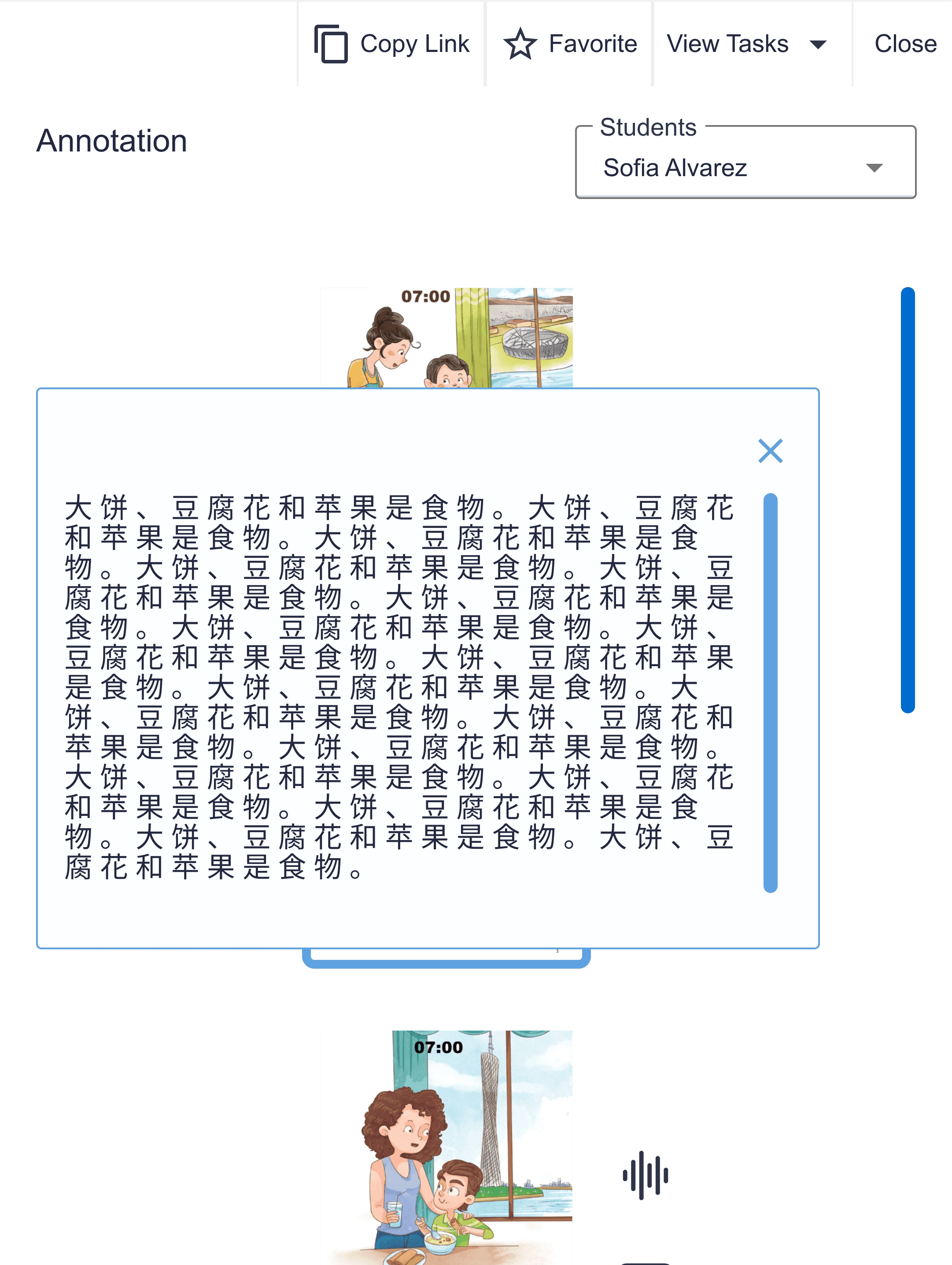
Support Text + Audio Annotations
Drawing on 10 years of language teaching experience, I designed flexible viewing where teachers can read text OR listen to audio.
“
I like the option of voice and written memo. This will help my lower students who can't write in Chinese yet."
A. Yao, Kindergarten Mandarin teacher
Students express thinking orally before they can write fluently.
Having text and voice options helps teachers collect and understand student thinking, no matter the format.
Voice Annotation
Text Annotation
THE SOLUTION
Helping Teachers See Student Thinking in Digital Reading
New feature integrated into existing workflow


Choice to go thorugh the book in order, or select pages with sutdent annotations

Icon = available annotations
See annotated texts by hovering over voice or text annotation.